softosaur

Editorial analysis
The marketing manager had done more than suggest a new app. Their CMO agreed with the case for Notion. They spent hours building workflows, simplified the setup and held one-to-one calls with colleagues. Six months later, they reported, the team had returned to spreadsheets, email and scattered messages.
The account on r/projectmanagement captures a particularly frustrating kind of software rollout: the system exists, people have seen how it works, and its creator still has to collect the information it was meant to organize.
It is one person’s account, without access to the team’s side of the story. We cannot establish why that rollout faltered. But alongside other public discussions and research into collaboration, it opens a useful question for anyone choosing team software: what happens between doing the work and keeping the shared system current?
The person who builds the workspace sees a different problem
For the manager, the problem was visible. Decisions and campaign details were scattered across documents, meetings and messages. Gathering them could take hours. Notion already helped with their personal projects, so extending it to the team seemed reasonable.
From a colleague’s position, however, the relevant question may be smaller: what does entering this update help me do next?
A commenter using the name BrIDo88 raises that possibility: a new process can appear to help its initiator at everyone else’s expense. Other replies emphasize leadership backing or enforcement. These are competing interpretations; the team’s own explanation is missing.
A separate discussion about fading adoption describes the same split more sharply. Its now-deleted author says a new project tool eventually becomes something the PM updates for leadership, while actual work continues in Slack. Commenters ask whether the system serves a real need and whether people besides its organizer have a reason to use it.
The recurring question is who needs the record enough to keep it useful. These discussions establish that question, rather than how common the problem is.
The extra work has to land somewhere
There is a research tradition behind that question. In a 2024 i-com paper, Melanie Duckert and Pernille Bjørn revisit challenges in collaborative software through ethnographic work conducted in two organizations during 2023. One concerns the uneven distribution of the effort needed to make a shared technology function and the benefit it provides.
Their observations are not about Notion. One case concerns Meta’s Workplace alongside an established Microsoft Teams environment. Employees had to remember when another platform was relevant and make additional efforts to post and follow updates. Its overlapping role was part of the problem.
The study also sets an important boundary: the researchers arrived when the systems were already in use, limiting what they could observe about their original adoption. This is qualitative evidence from particular organizations, not a failure rate for collaboration tools.
The lens is useful for the Notion question without settling it. An update can be valuable to the person assembling a portfolio report and costly to the person who has already explained the same thing elsewhere. Those two experiences can coexist inside a workspace that everyone initially approved.
A second tracker can be a way to keep work visible
In another project-management thread, a person overseeing several programs describes using Todoist, Favro, Excel and Word. They track tasks in both Favro and spreadsheets because a spreadsheet makes the information easier to find again than archived cards.
Their later replies clarify the concern. They are losing trust in where to find current information. Departments are inconsistent about following up on projects. They want a framework for managing work, rather than another set of documents to maintain.
That detail changes the question. Simply deleting the spreadsheet would remove the place this person still relies on for visibility. Moving everything into a new app would not, by itself, explain where a completed item can be found or which record takes precedence when two versions disagree.
Multiple tools can have distinct jobs: conversation, detailed task execution, financial analysis or long-term reference. The point at which those jobs overlap deserves scrutiny. If one decision requires separate manual updates in two trackers, someone has to reconcile them. A dashboard can hide that maintenance work while still depending on it.
Notion can share a record without giving everyone the same view
The technical possibilities matter here. Notion’s data-source documentation explains that a linked source can appear in another database. Its views, filters, sorts and groups can differ, while edits to the source’s properties or pages are reflected in the original. Access still depends on the original database’s permissions.
That provides a way to present the same underlying work differently without maintaining separate copies inside Notion. A contributor’s focused view and a manager’s overview need not become two independently updated task lists. Keeping an existing spreadsheet or chat in step with that record is a separate task.
Notion also supports comments on pages and database records, plus mentions that direct colleagues to a particular discussion. Its collaboration documentation notes a meaningful exception: mentioning someone on a page they cannot access will not notify them.
Whether those features would have helped this team remains unknown. For a buyer, the practical question is whether an ordinary participant can reach the right record, make a useful update and see its consequence.
Follow an update before choosing the replacement
For a team facing this situation, a useful diagnostic is to trace one recent piece of work through the existing setup. Where was a change first agreed? Who entered it into a tracker? Did someone enter it again? Where did the next person look before acting?
Consider a hypothetical launch-date change. A colleague agrees the new date in chat. Someone changes a spreadsheet; someone else is expected to update Notion. At the next review, the manager opens the workspace and sees the old date. The team has communicated, and the shared record is wrong.
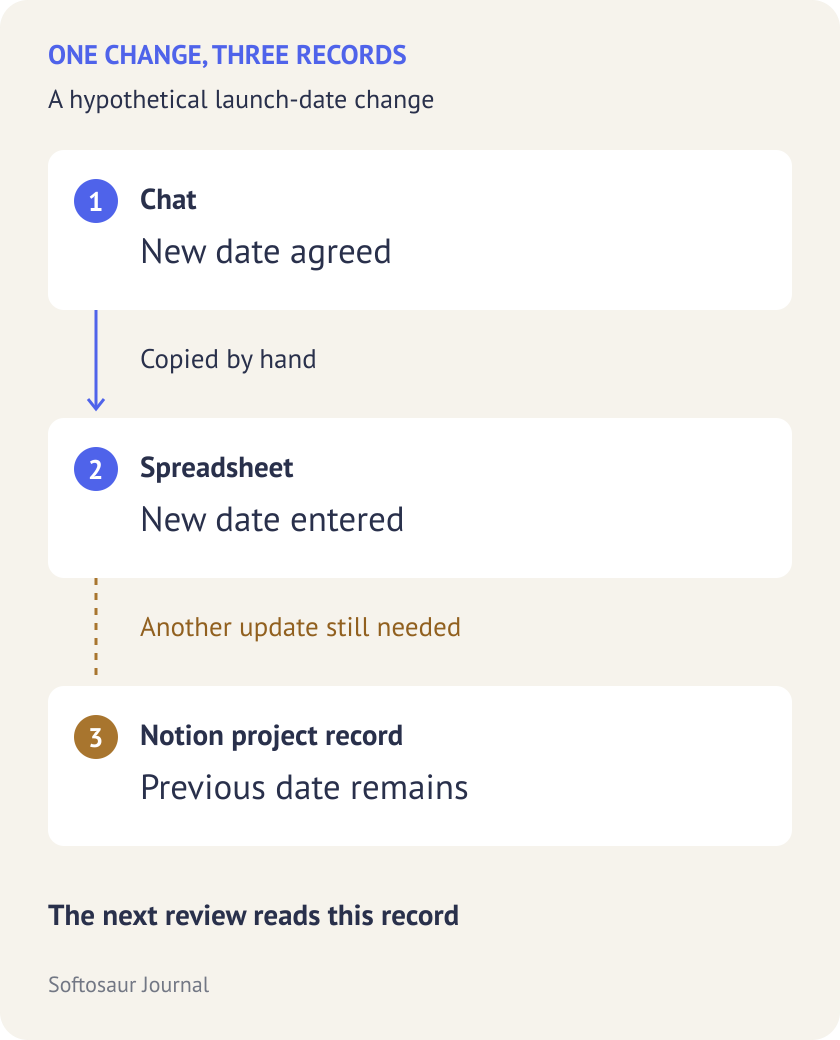
Now change the route: the date is updated in the project record, and the chat discussion links to that record. Before this can work, people need access, a clear owner for the update and a reason to consult the record next time. Moving the conversation alone does not supply those conditions.
Following one actual change may expose a missing permission, a confusing view, an unnecessary field, an unowned reporting task or a process that two departments understand differently. Those possibilities call for different changes.
The marketing manager’s abandoned setup leaves those questions unanswered. Buying another tool would leave them unanswered too, unless the evaluation included the people maintaining the information and the people relying on it.
When comparing project-management software, bring that whole sequence into the evaluation. Ask which existing update the new system replaces, who benefits from the change and where the next decision will happen. A workspace becomes part of the job when keeping it current helps the work move forward.