softosaur

Prepared from documented information
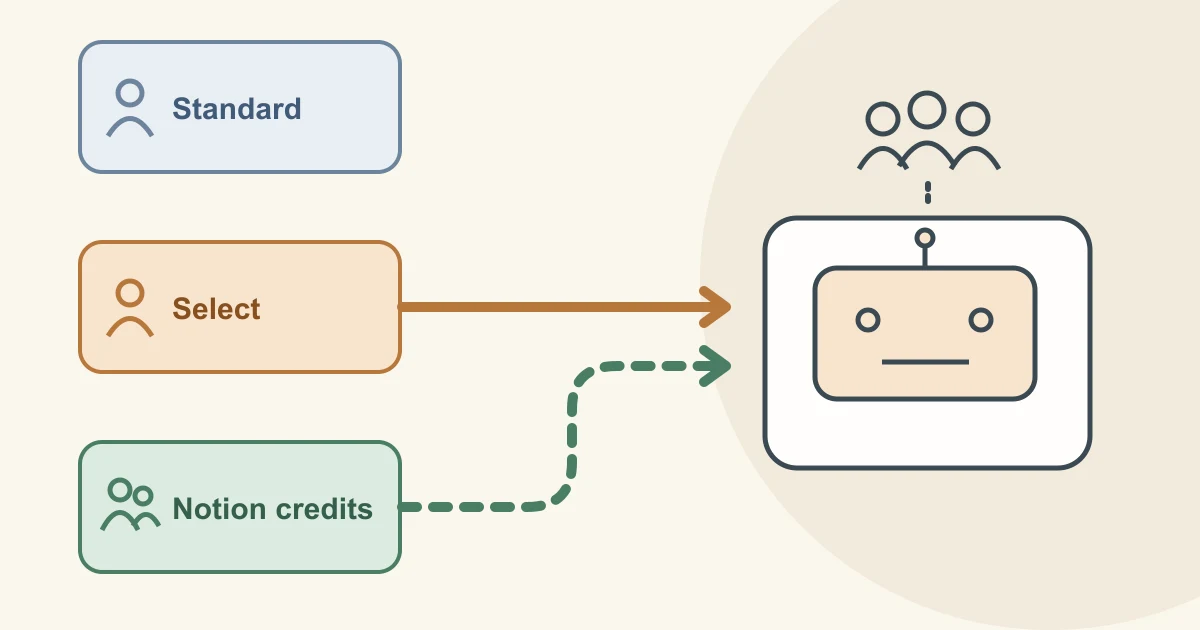
Sharing a Notion Custom Agent with a team does not automatically divide its credit use among the people who run it. Under the current default, a new shared agent uses its owner’s Select credits. An older agent or one funded by the workspace may use a different balance, so check the agent before treating “shared” as “paid for by the workspace.”
The confusion is visible in a reader discussion about Standard and Select credits: users are trying to understand why choosing a model and letting Notion choose one draw on different allowances. The posts describe their concerns; they are not a controlled test of cost or output quality.
Follow one shared agent’s spending
Suppose you create a Custom Agent to prepare a weekly status report and share it with colleagues. This is a hypothetical example, not an agent we ran. According to Notion’s Custom Agent credit guide, its default spending comes from your Select allowance even when someone else uses it.
You can cap the agent’s spending. A workspace owner can instead fund it directly with a monthly budget of Notion credits, bypassing your personal allowance. These are different arrangements: one limits how much the agent can use; the other changes which balance pays.
Standard and Select do not form one larger balance
Notion announced the new system on 19 October, with existing customers scheduled to move on 2 November. Its current help lists 1,500 Standard and 500 Select credits per member each month on Business and Enterprise, while warning that the amount can vary by plan and purchase arrangement. Check the allowance shown for your own account.
Standard and Select are usage allowances, not cash balances. The eligible-feature table assigns personal Notion Agent work on Auto to Standard credits. A model you choose yourself uses Select. Custom Agents use Select or workspace Notion credits; the table does not assign them Standard credits.
For the status-report example, spare Standard credits are therefore not a reserve you can transfer to the agent. Switching personal Notion Agent chat to Auto may keep that covered work available, but it does not turn the two allowances into one pool.
Check when the agent was created
There is an important exception in the Custom Agent guide: agents created before 2 November 2026 continue to draw from shared workspace credits. Do not assume an established reporting agent follows the default for a newly created one.
Open the agent’s Credits section and check Credit source. The documented choices include Owner allowance and, for workspace funding, Workspace budget. Read that source together with the creation-date exception. The list of people who can use the agent does not show which balance pays.
For a new report agent, ask the workspace owner to confirm the funding arrangement before inviting more people to use it. Increasing the audience and funding the work are separate decisions.
A higher limit does not buy more credits
The allowance guide explains that approving a member’s request for a higher Notion credit limit raises that person’s limit; it does not purchase credits. The workspace also needs an available balance. Each member’s Standard and Select allowances reset at the start of the billing cycle. Unused amounts do not roll over, and members cannot transfer or exchange them.
If the report stops, start with its funding source and the agent’s cap. If it uses the owner’s allowance, check that person’s extra Notion credit limit as well. A pause in one agent does not show that the entire workspace balance is empty. Continuing on workspace credits depends on permission and available credits. For this workflow, the useful record is simple: who owns the agent, which balance funds it, and which limit can pause it. The number of people using it does not answer those questions.